Twitter GIF Downloader
Download animated GIFs from Twitter (X) in their original quality. Choose between smooth MP4 loops or traditional .gif files in one click. No app or login needed.
Ready to download
Download animated GIFs from Twitter (X) in their original quality. Choose between smooth MP4 loops or traditional .gif files in one click. No app or login needed.
Ready to download
Skip the browser entirely! Open our official X Downloader Bot , send it any public X link, and get the media delivered instantly to your chat. Learn how to use the bot ↓
XSaverBot is a free online tool built to extract and save animated GIFs from any public X (formerly Twitter) post — in the highest available quality, with zero watermarks and no software required. We retrieve the original source file directly from Twitter's content delivery network, bypassing the heavy compression applied to animations you see in your timeline.
Whether you are saving a funny reaction, a sports moment, a tutorial loop, or a brand animation, XSaverBot works seamlessly on Chrome, Safari, Firefox, and Edge — across Windows, Mac, iPhone, and Android.
Save any Twitter animation in your preferred format in three quick steps
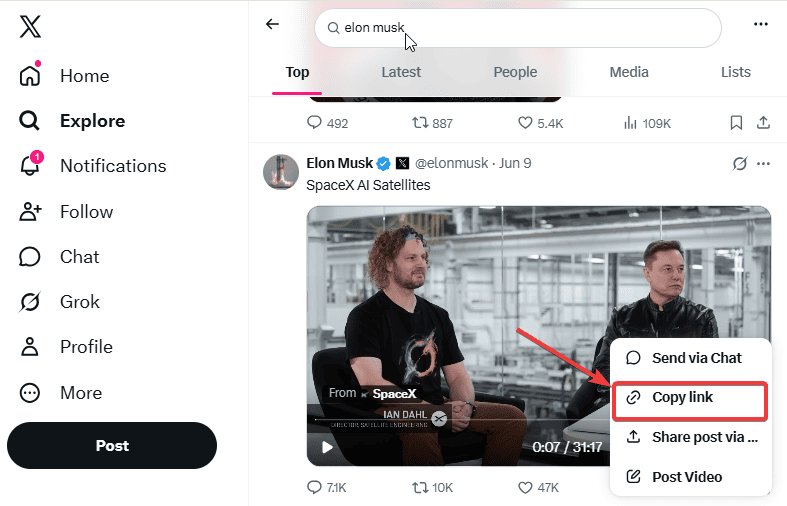
Navigate to the X app or website and find the post with the animated GIF you want to save. Tap the Share icon (the upward arrow) and select Copy Link to copy the post URL to your device's clipboard.
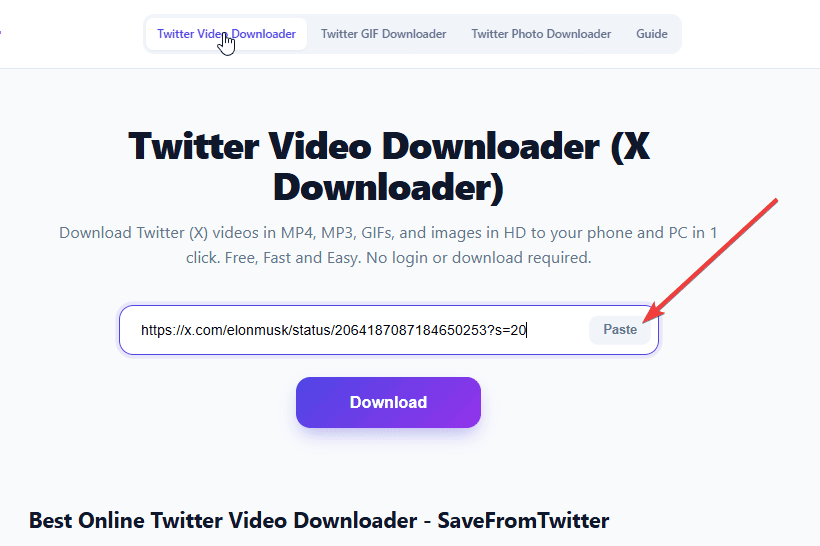
Return to this page and paste the copied URL into the input box at the top. Use the Paste button to pull it directly from your clipboard, or paste manually with Ctrl+V / Cmd+V. Click Download and the tool will instantly detect the animated media in the post.
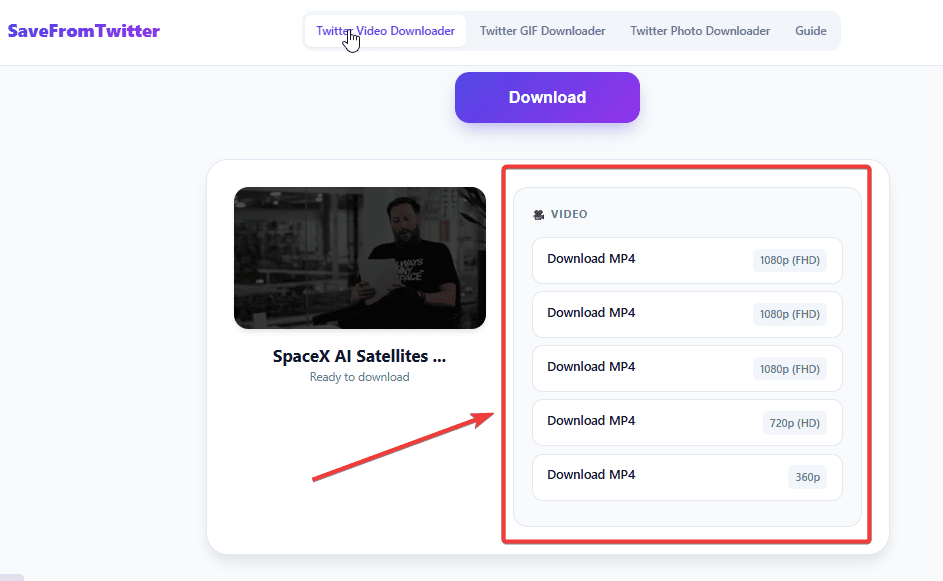
Once processed, you will be presented with format options. Click Download next to either the optimized MP4 or the traditional GIF format, and the file saves immediately to your device. Not sure which to choose? See our MP4 vs GIF guide below.
Built for speed, quality, and complete user privacy
We fetch the original source file directly from Twitter's content delivery network, ensuring your downloaded GIF or MP4 retains its original frame rate and clarity — with no additional compression from our end.
Unlike other tools that force a single output, XSaverBot gives you the choice. Get the lightweight, smooth-playing MP4 loop, or the universally compatible traditional .gif file — whichever works best for your platform or use case.
No hidden paywalls, no daily download limits, and no watermarks stamped over your saved animations. Every feature is completely free — forever. No account, no email, no payment details required.
No browser extensions, no desktop software, and no account creation. The entire process happens securely in your web browser in seconds. Works on every major browser and device without setup.
XSaverBot does not require an account, does not log your activity, and does not retain any files on our servers. All processing happens in real time over a secure HTTPS connection. Your downloads stay completely private.
Understanding the difference helps you choose the right file for every situation
When a GIF is uploaded to Twitter, the platform automatically converts it to a silent looping MP4 to reduce file size and ensure smooth playback. Downloading the MP4 gives you a file that is significantly smaller, plays at a higher frame rate, and works flawlessly on all modern smartphones, tablets, and video players. Best for: Personal viewing, WhatsApp and Telegram sharing, and saving device storage.
While MP4 is the better format for playback quality and file size, certain platforms and applications still strictly require the .gif file extension. Downloading in traditional GIF format ensures compatibility with older messaging apps, web forms, and content management systems that do not support MP4 embeds. Best for: Discord, Slack, Reddit, website embeds, and CMS platforms.
XSaverBot is used daily by people across a wide range of purposes and professions:
Your animations saved exactly where you need them — no app required
Open XSaverBot in Safari or Chrome on any iOS device. Paste the tweet link, choose your format, and the file downloads directly to your Files app or Photos library — no app installation needed. GIF files can be shared instantly via iMessage or AirDrop.
Open XSaverBot in Chrome, Firefox, or Samsung Internet on any Android device. Your chosen file — MP4 or GIF — saves immediately to your Downloads folder or Gallery app, ready to share via WhatsApp, Telegram, or any messaging app.
Save GIF loops and MP4 animations directly to your desktop in any modern browser. Files save to your default Downloads folder and open in any media player or image viewer. Ideal for video editing projects, presentations, and offline creative work.
Everything you need to know about saving animated media from X
Twitter automatically converts all uploaded GIFs into silent, looping MP4 files to save bandwidth and improve playback smoothness. XSaverBot gives you the option to download it in this optimized MP4 format, or as a traditional .gif file.
Yes. When you process a tweet containing a GIF, XSaverBot provides both MP4 and traditional GIF download options so you can choose whichever format works best for your platform.
No. Animated GIFs on Twitter and X are strictly silent loops. If a post has audio, it is a standard video — download it using our Twitter Video Downloader.
Absolutely not. XSaverBot retrieves the original, clean media file directly from Twitter's servers without adding any logos, watermarks, or branding.
Yes. The tool is entirely browser-based. Save GIFs directly to your iPhone Files app, iOS Photos library, or Android Gallery without installing any third-party apps.
Yes. We do not require accounts, we do not track your download history, and we do not store any files on our servers. All processing happens in real time via secure HTTPS connections.
The most common reasons are: the tweet has been deleted, the account is set to private, or the post does not contain animated media. Confirm the link is from a public tweet that contains a GIF, then try again.
XSaverBot is a free online utility for downloading GIFs, videos, and photos from public Twitter and X posts. No software, extensions, or registration required.
XSaverBot is not affiliated with, endorsed by, or sponsored by Twitter or X Corp. We do not host any media on our servers. All content is processed in real time from publicly available sources and delivered directly from X's own content delivery networks (CDNs). Users are solely responsible for ensuring their use of downloaded content complies with applicable copyright laws and platform terms of service.