Twitter Video Downloader
Download Twitter (X) videos in MP4, MP3, GIFs, and images in HD to your phone and PC in 1 click.
Ready to download
Download Twitter (X) videos in MP4, MP3, GIFs, and images in HD to your phone and PC in 1 click.
Ready to download
Skip the browser entirely! Open our official X Downloader Bot , send it any public X link, and get the media delivered instantly to your chat. Learn how to use the bot ↓
XSaverBot is a free online Twitter (X) video downloader that lets you save videos, GIFs, and photos in high quality directly from public posts. No app, software, or registration required.
Simply paste the tweet link and download content to your phone, tablet, or computer. Works on all major browsers and devices, including Chrome, Safari, Firefox, Edge, iPhone, Android, Windows, and Mac.
Follow these 3 simple steps to save any Twitter video
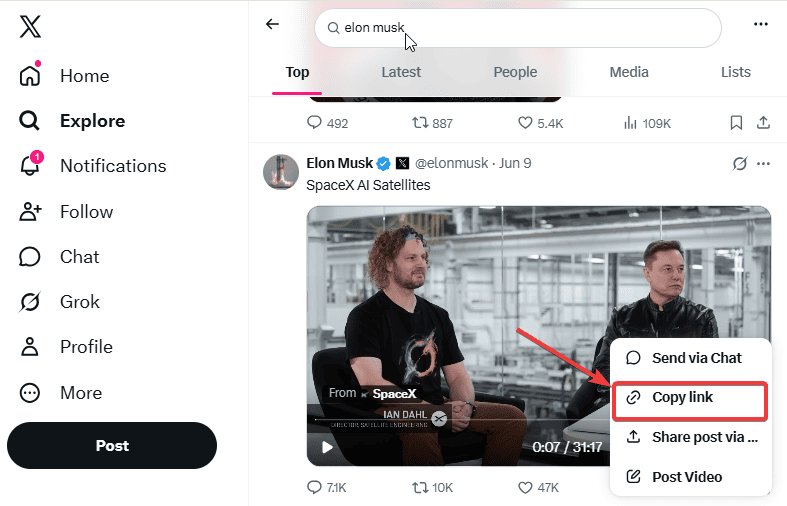
Open the Twitter X app or visit x.com (formerly twitter.com) on your phone or PC. Find the post with the video or GIF you want to download. Tap the "Share" icon at the bottom left corner of the video and select "Copy Link" to save the URL to your clipboard.
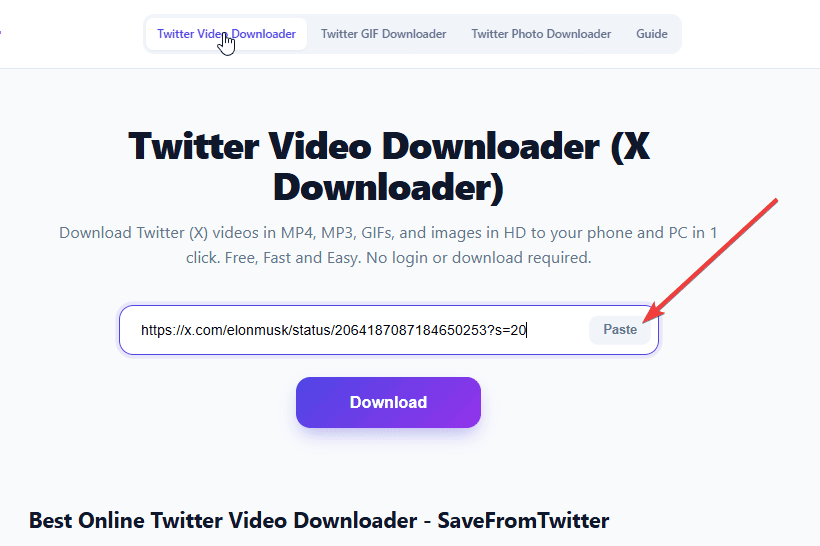
Return to XSaverBot and paste the copied link into the input box at the top of the page. You can also use the Paste button to insert the copied link directly from your clipboard. Once pasted, click the "Download" button for our tool to process the Twitter video link.
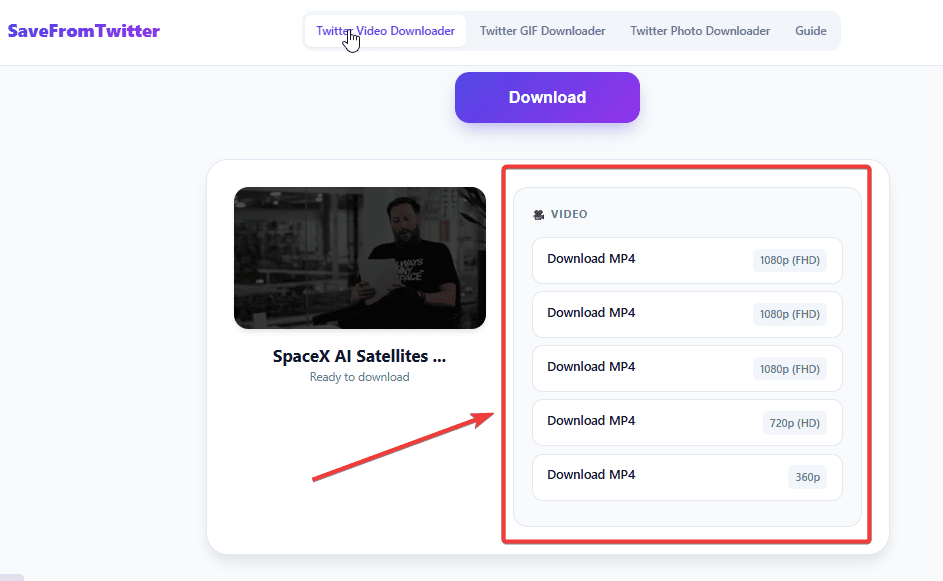
Once processed, you'll see a list of available video resolutions and quality such as SD, HD, FHD, 1080HD, etc. Click the "Download" button next to your preferred quality, and the Twitter video MP4 file will automatically save to your phone, tablet, or computer.
There are many Twitter video download tools online, but XSaverBot offers a faster, simpler, and more reliable experience.
XSaverBot is 100% free. No daily limits, no watermarks on downloads, no premium plans, and no payment details required. Every feature is available to every user at no cost.
No Twitter account, email address, or sign-up of any kind is needed. Simply paste the link and download to your device, nothing else.
XSaverBot works on iPhone, Android, Windows, Mac, and Linux. It runs in every modern browser including Chrome, Safari, Firefox, and Edge. No app, extension, or plugin required.
Tweet links are processed in seconds with download links ready almost instantly. No queues, no upload steps, no waiting.
XSaverBot does not collect personal data, store your downloaded files, or track what you download. Every connection is protected with HTTPS encryption.
Twitter rebranded to X in 2023. XSaverBot handles both twitter.com and x.com links automatically. No adjustment needed on your end.
Twitter and X host videos at multiple resolutions depending on what the original creator uploaded. XSaverBot detects every available quality option so you can choose what works best for your device and storage.
Full high-definition quality. Best for watching on large screens, video editing, or archiving important clips. Available on most videos uploaded natively to Twitter and X.
Standard definition with smaller file sizes. Downloads faster and uses less storage — ideal for mobile viewing or saving data on a limited plan.
Extract just the audio track from supported Twitter videos. Useful for podcasts, interviews, speeches, and music clips shared on X.
Save Twitter animated GIFs from any public tweet with no quality loss
XSaverBot detects and downloads animated GIF content from any public tweet on Twitter or X, with no quality loss.
When you post a GIF to Twitter, the platform converts it internally to a silent looping MP4 for faster playback. XSaverBot retrieves the original source and gives you two options:
Simply paste the tweet link containing the GIF, click Download, and choose your preferred format. Works on all devices. For the full GIF downloader guide and dedicated tool, visit our Twitter GIF Downloader page.
Get full-resolution twitter photos without compression or cropping
XSaverBot lets you download photos from any public tweet at their full original resolution — no compression, no cropping, no watermarks added.
Download the full-resolution version of any photo. XSaverBot retrieves the original source file, not the compressed preview Twitter displays in the timeline. This makes a significant difference for photography, news images, infographics, and any visual where sharpness matters.
Twitter allows up to four photos per tweet. XSaverBot detects every image in the post and lets you download each one individually at its original resolution. No bulk download limits.
Twitter photos save as JPG or PNG, matching the original upload format. No conversion, no quality reduction.
For the full photo downloader guide and dedicated tool, visit our Twitter Photo Downloader page.
XSaverBot is a fully browser-based X downloader. No installation, no extensions, no accounts needed on any platform.
Save Twitter and X videos directly from any browser on Windows, Mac, or Linux. Paste the link, choose your quality, and download to your computer in seconds.
Open XSaverBot in Chrome or any Android browser. Paste the tweet link and save the video, GIF, or photo directly to your Downloads or Gallery folder.
XSaverBot works in Safari and all iOS browsers. Paste the tweet URL and download videos, GIFs, and photos without installing any app.
Download Twitter and X videos in MP4 format on any Windows PC or Mac. Save directly to any folder and play offline anytime.
Answers to common questions about our free Twitter video downloader
Yes. XSaverBot is completely free with no hidden fees, subscription plans, or registration requirements.
Yes. Open XSaverBot in your mobile browser, paste the tweet link, and download the video directly to your device — no app needed.
Twitter videos download as MP4. Where available, you can choose HD (1080p / 720p) or SD (480p / 360p). GIFs save as MP4 or GIF, and photos download at their original resolution.
The most common reasons are: the account is private or protected, the tweet has been deleted, or the post contains no media. Confirm the tweet is public, contains a video or image, and that the link is correct, then try again.
No. XSaverBot is entirely browser-based and works on all devices without plugins, extensions, or software downloads.
Yes. Paste any tweet link containing a GIF and XSaverBot will detect and download it directly to your device.
Downloading for personal offline viewing is generally acceptable. Redistributing, re-uploading, or using downloaded content commercially without the creator's permission may violate copyright law. Always respect the rights of the original creator.
No. XSaverBot does not store, log, or retain any downloaded files or personal data. All processing happens in real time and files go directly to your browser.
Your trusted source for safe, high-quality Twitter media downloads
XSaverBot is a free online tool for downloading videos, GIFs, and photos from public Twitter and X posts. No software, extensions, or registration required.
XSaverBot is not affiliated with, endorsed by, or sponsored by Twitter or X Corp. We do not host any videos, images, or media on our servers. All content is processed in real time from publicly available sources and delivered directly from Twitter and X's own content delivery networks. Users are responsible for ensuring their use of downloaded content complies with applicable copyright laws and platform terms of service.